Pause & Resume
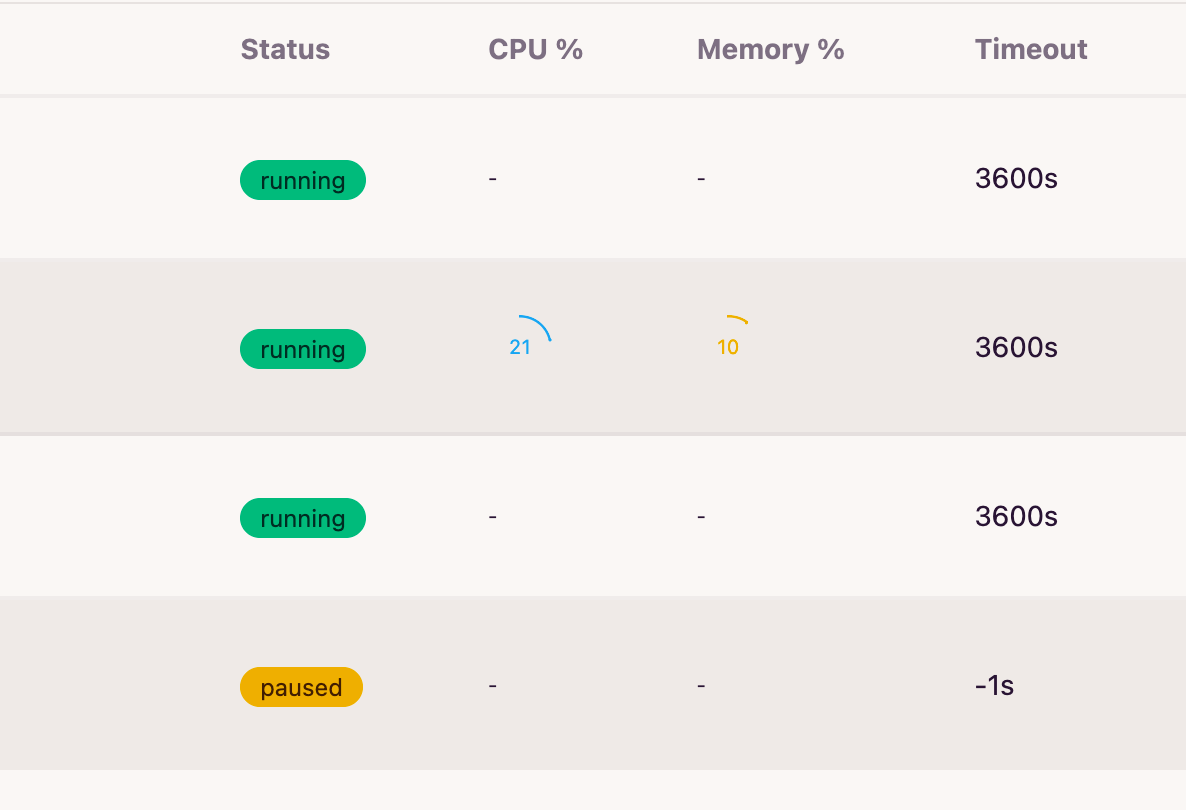
A sandbox normally costs compute for as long as it's running. Pause stops consuming CPU and memory and Resume brings it back.
How it works
Pausing a sandbox:
- Captures the list of processes currently running inside it (via
envd) and stores that snapshot as an annotation on the sandbox'sReplicaSet. - Scales the
ReplicaSetto0replicas — the Pod is terminated, so compute usage drops to zero.
Resuming a sandbox:
- Scales the
ReplicaSetback to1replica and waits for the new Pod to become ready. - Replays the captured snapshot, restarting each process with the same command and arguments it was launched with.
What survives, what doesn't
A fresh Pod is created on resume, so the container's local disk is not preserved — only the process list is restarted. If your workload needs data to survive a pause, mount a network volume as described in Shared Network Storage.
Two ways to trigger it
Manual, via the REST API
Pause and resume any sandbox on demand:
curl -X POST http://<host>/api/v1/sandbox/pause/sandbox-01 \
  -H "Authorization: Bearer <api-key>"

curl -X POST http://<host>/api/v1/sandbox/resume/sandbox-01 \
  -H "Authorization: Bearer <api-key>"
Manual pause/resume works regardless of any feature flag — it's always available.
Automatic, on timeout and first access
Set these fields at sandbox creation time:
| Field | Description |
|---|---|
timeout |
Max lifetime in seconds before the sandbox is considered expired. |
autoPause |
When true, an expired sandbox is paused instead of deleted. |
autoResume |
When true, a paused sandbox automatically resumes the moment it receives a new request (SDK connect, or any proxied request to it). |
sequenceDiagram
    participant Client
    participant Controller
    participant Pod as Sandbox Pod

    Client->>Controller: create(timeout=300, autoPause=true, autoResume=true)
    Controller->>Pod: start
    Note over Controller: timeout elapses, sandbox idle
    Controller->>Pod: snapshot running processes
    Controller->>Pod: scale replicas to 0
    Note over Pod: Pod terminated (status: paused)

    Client->>Controller: new request
    Controller->>Controller: status == paused && autoResume == true
    Controller->>Pod: scale replicas to 1, wait ready
    Controller->>Pod: restart snapshotted processes
    Controller-->>Client: request proxied through
Automatic pause-on-timeout also requires the PAUSE_RESUME feature flag to
be enabled (see Environment Variables) for the calling user —
otherwise an expired sandbox is deleted instead of paused, even if
autoPause is set. Auto-resume-on-access has no such requirement; it only
depends on autoResume.
Example
Using the E2B-compatible SDK, create a sandbox that pauses on timeout and resumes automatically on the next access, then start a background server inside it:
from e2b import Sandbox

sbx = Sandbox.create(
    template="sandbox-base",
    timeout=5 * 60,  # pause after 5 minutes of no activity
    lifecycle={"on_timeout": "pause", "auto_resume": True},
)

# a long-running background process — its command line gets captured on pause
sbx.commands.run(
    "PYTHONPATH=/workspace/pylibs PATH=/workspace/npm/bin:$PATH python3 server.py > service.log 2>&1",
    background=True,
    timeout=0,
    cwd="/workspace",
)

print(sbx.sandbox_id, "is running")
If nothing talks to the sandbox for 5 minutes or call pause api, the controller pauses it and scales the Pod down to zero.
You can see exactly what was captured through get_info() — the snapshot
comes back as a base64 string under info.metadata["snapshot"]:
import base64, json

info = sbx.get_info()
print(info.metadata["snapshot"])
# eyJjYXB0dXJlZF90aW1lIjoiMjAyNi0wOS0wM1QwMzoyNToyMS4yMDEzNTQ1NjlaIiwicHJvY2Vzc2VzIjpbeyJjb25m
# aWciOnsiY21kIjoiL2Jpbi9iYXNoIiwiYXJncyI6WyItbCIsIi1jIiwiUFlUSE9OUEFUSD0vd29ya3NwYWNlL3B5bGli
# cyBQQVRIPS93b3Jrc3BhY2UvbnBtL2JpbjokUEFUSCBweXRob24zIHNlcnZlci5weSBcdTAwM2Ugc2VydmljZS5sb2cg
# Mlx1MDAzZVx1MDAyNjEiXSwiY3dkIjoiL3dvcmtzcGFjZSJ9LCJwaWQiOjIwfV19

snapshot = json.loads(base64.b64decode(info.metadata["snapshot"]))
print(json.dumps(snapshot, indent=2))
{
  "captured_time": "2026-09-03T03:25:21.201354569Z",
  "processes": [
    {
      "config": {
        "cmd": "/bin/bash",
        "args": [
          "-l",
          "-c",
          "PYTHONPATH=/workspace/pylibs PATH=/workspace/npm/bin:$PATH python3 server.py > service.log 2>&1"
        ],
        "cwd": "/workspace"
      },
      "pid": 20
    }
  ]
}
sbx.commands.run(..., background=True) is what wraps your command as
/bin/bash -l -c "<your command>" — that's why cmd/args show the shell
wrapper rather than python3 directly.
The next call that touches this sandbox — another SDK call, or a request
routed to it through its port — triggers an automatic resume: a new Pod
comes up, and the controller re-runs that exact cmd/args in it.
# ... later, possibly from a different process ...
sbx = Sandbox.connect(sbx.sandbox_id)  # transparently resumes if paused
result = sbx.commands.run("tail service.log", cwd="/workspace")
python3 server.py is running again with a brand-new PID — the snapshot
only restarts the process, it doesn't restore its old PID or any in-memory
state, so service.log only has whatever the new process has written so
far. info.metadata["snapshot"] keeps showing this same JSON — reflecting
the last pause — until the sandbox pauses again.
To manage the same sandbox by hand instead, use the native REST API:
curl -X POST http://<host>/api/v1/sandbox/pause/<name> \
  -H "Authorization: Bearer <api-key>"

curl -X POST http://<host>/api/v1/sandbox/resume/<name> \
  -H "Authorization: Bearer <api-key>"
See also
- Shared Network Storage — how to make data survive a pause/resume cycle
- API Reference — full REST and E2B-compatible API surface
- Environment Variables — feature flags, including
PAUSE_RESUME